98% of shoppers say reviews are essential for making purchase decisions. So, if every one of your items has a solid Google Product Review to go with it, you’re onto a winner.
In this handy guide, we’ll dive into the nitty gritty of Google Product Reviews and Ratings, exploring where they appear, how to add them to your shopping ads, and their impact on visibility and your bottom line.
Skip to:
What Are Google Product Reviews?
A Google Product Review is a customer’s opinion about a specific product they’ve purchased. Reviews can be collected via third-party apps like Trustpilot and submitted to Google through manual or automated Product Review feeds.
Crucial for the buyer journey and decision-making process, they allow people to see how your product performs based on real-life experiences, from durability to ease of use, and how they fare against expectations.
This helps inform buyers and establish trust in your products, which is important in highly competitive environments like Google Shopping, where customers can face walls of almost identical products.
What are Google Product Ratings?
Google Product Ratings are the aggregated star scores that appear in Google Shopping Ad results. These are only eligible for display when Google has received at least 50 product-specific reviews across your Merchant Center account and act as quick social proof regarding your products.
The two terms are sometimes used interchangeably, but it’s important to distinguish between the two. Reviews are the written feedback, and ratings are the visible stars, which only appear if the underlying reviews exist and meet Google’s eligibility criteria.
Where do Google Product Ratings Appear?
Google Product Ratings can show up in multiple places. To read the full written Product Reviews, users need to click through to the product listing or merchant page.
Here are where customers can find Google Product Ratings:
- Google Shopping Ads: This is the most important and common placement you’ll find Google Product Reviews.
- Free Google Shopping listings: Unpaid listings can also include Product Reviews, giving them a better chance of attracting attention.
- Search engine results pages (SERPs): If your product schema has been input correctly, Google Product Reviews can be found in SERPs as rich snippets. These highlight review information directly in the organic listing.
- Google Seller Ratings: While Product Reviews focus on individual items, Google Seller Ratings are a combined score for your business using several review platforms that can influence the performance of your Google Shopping and Text Ads. These only appear if your business has received at least 100 seller reviews in the past 12 months.
By combining the above, you can prove to potential customers that your products and brand are both top-notch. This ultimately gives you more conversion power.
Google Product Reviews vs Other Ratings
It’s easy to confuse the various review types across Google, but each of them has its own unique purpose:
Google Product Reviews
These are written for products (and products only!) and can influence conversions by demonstrating positive buyer feedback, AKA social proof, in Google Shopping reviews and organic listings.
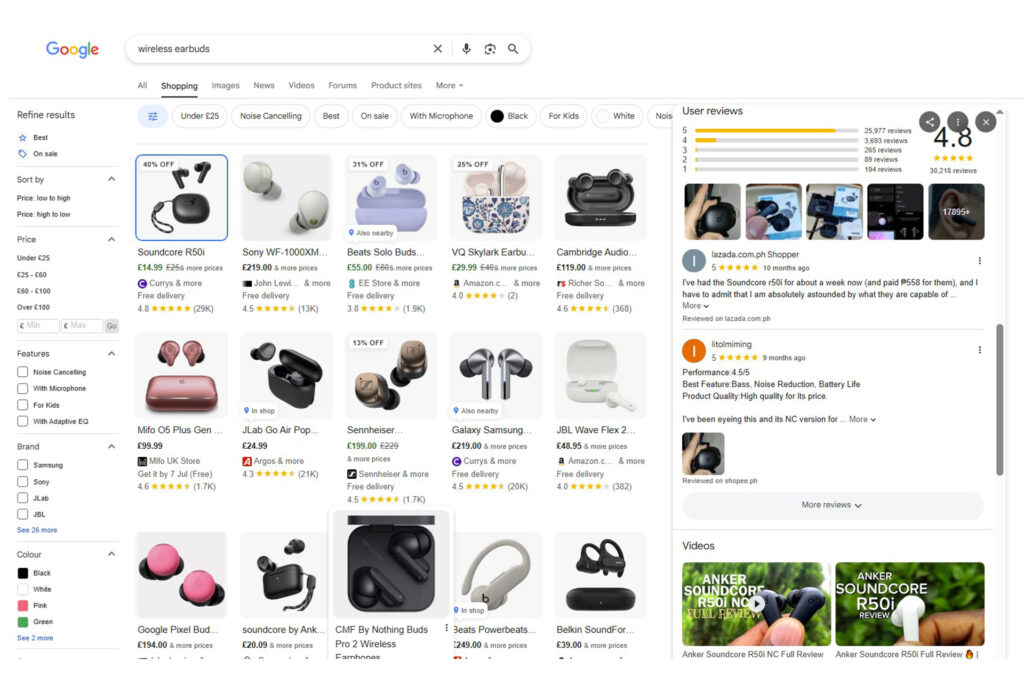
The image below shows a Google Product Rating, rather than a Product Review, which can only be accessed after clicking the product listing or the merchant’s page.

Now, here are the Google Product Reviews in action:
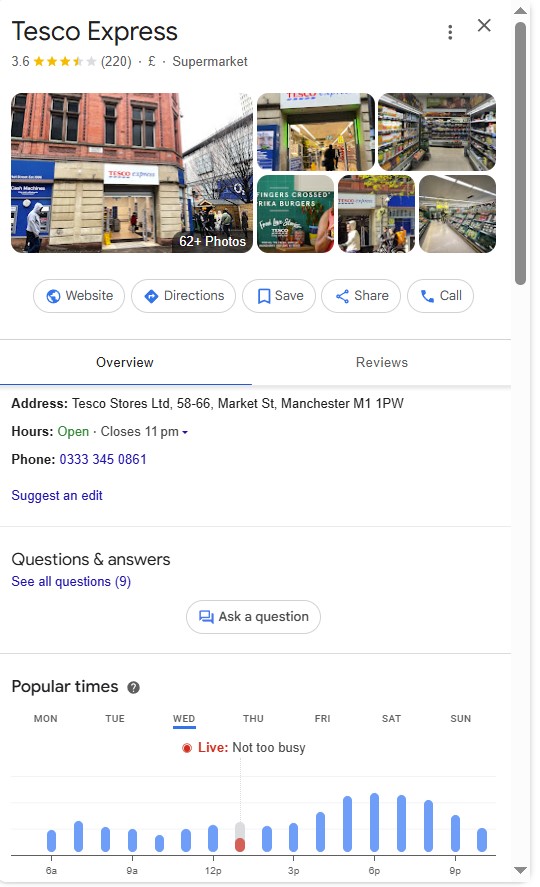
Google Business Reviews
Business reviews are tied to your entire business, not just a product, and are also known as Google Reviews. They appear in Google Maps, your Google Business Profile, and local search results, and reflect your overall customer service and purchasing experience.
Merchant Reviews (Seller Ratings)
Google Merchant Reviews, or Google Seller Ratings, are amalgamated from different online review platforms into one singular rating.

The above example from Google Shopping shows merchant reviews in action, with star ratings combined from different review platforms and displayed alongside Shopping Ads when a seller has enough recent feedback. You can check your Google Seller Rating here.
Seller Ratings and Business Reviews are fantastic for ad campaigns by attracting more people to begin with, while Product Reviews can turn this interest into clicks and sales. This helps you establish more of a presence in Google Shopping results, lowering CPC (cost per click) and improving ROAS (return on ad spend).
Keen to understand the wider benefits of reviews for your business? Find out why reviews are important and how Google Seller Ratings can increase sales.
Why Google Product Reviews Matter for Visibility and Sales
Google Product Reviews are key influencers for digital performance, and can change the fate of your business on multiple levels, particularly regarding Google Shopping reviews and paid ad results:
- Better CTR (click-through-rate): Products with high star ratings are more visually appealing in shopping results and establish trust in your business. This increases the chances of receiving a click.
- Improve conversion rates: Positive reviews reduce buyer hesitation by offering social proof, which can entice shoppers to use your website instead of your competitors’.
- Support Google Ads performance: While they aren’t a direct component, positive Product Reviews can indirectly improve your Google Ad Rank and reduce CPC by demonstrating quality.
- Improve SEO: While Google Product Reviews are excellent for paid ads, they also feed into Google’s E-E-A-T (experience, expertise, authoritativeness, and trustworthiness) framework by providing keyword-heavy user-generated content. This can help you move up the rankings.
- Optimise AI overviews: Customer experiences and opinions often train AI models to provide more accurate overviews. This is becoming increasingly important as more people rely on AI for their information.
For your business, the above do much more than simply help you sell products. They improve ad performance, help you maximise your budget, and can enhance SEO for your business.

How to Add Google Product Reviews to Shopping Ads
If you haven’t already, it’s worth enabling reviews on your Shopping Ad products.
To do so, follow these four simple steps:
1. Join Google’s Product Ratings Program
Visit the Google Merchant Center Help page and complete the interest form for the “Product Ratings Program.” To qualify, you must have at least 50 eligible Product Reviews, and your Merchant Center account must be active and correctly configured for Shopping Ads.
2. Submit a review feed
Next, compile a Product Review feed using the XML format. This should comprise fields like the product ID (which matches your Merchant Center feed), review date, star rating, name of reviewer, and the content.
Upload this to Google via the Merchant Center or automatically syndicate it from a review aggregator.
For help with formatting, check out Google’s Product Review specifications.
3. Use an aggregator
Platforms like reviews.io can be integrated with Google and simplify the process of getting your reviews online, which can be technical. You can also choose integrations that automatically collect reviews for your business, format your feed to meet Google’s criteria, and keep everything updated.
All of this saves you time and keeps things compliant with Google.
4. Maintain new reviews
Actively monitor your reviews in Google Merchant Center to make sure recent, positive reviews are given the limelight, as older reviews can be less impactful, and outdated content may not be as prominently displayed. Automation helps you continually collect recent feedback.
Combining product-level feedback with a great seller reputation, you can get your ads seen by more people, increase conversions, and contribute to the wider goal of growing your business online.
Best Practice Tips for Managing Google Product Reviews
Getting Google Product Reviews is just the start; you also need to manage them consistently for sustainable success.
Here are some top tips to ensure your reviews are well-managed:
- Automate review requests with after-purchase follow-ups for greater response rates.
- Publicly respond to every review, especially negative ones. Customers love transparency, and you can ease concerns with proactive honesty.
- Optimise your Google Business Profile with products and location-based listings that are fully integrated.
- Use the right review platforms with tools that support Google syndication, such as Yotpo.
- Drive initial traffic with PPC to create a stronger first impression, fuel review activity, and get more customers.
Final Thoughts
Google Product Ratings aren’t just shiny little stars; they’re incredibly important performance tools for brands operating online. They boost trust for potential customers and drive better Shopping Ads, stronger SEO performance, and efficient growth for your business.
Whether you run a SaaS company, sell products online, or are looking to scale a national retail operation, integrating Google Product Reviews into your strategy can make a substantial impact.
If you sell any products online and want to sell more, give our hive of experts a ‘buzz’ on 01904 373 069 or email hello@beefound.agency.